roboforex
RoboForex Platforms: MT4, MT5, cTrader and R StocksTrader
- Difficulty
- Beginner
- Time
- 3 min
On this page
RoboForex gives you four platforms to choose from. Pick the one that fits how you trade, then connect it. New to the broker itself? See the RoboForex review and What is forex trading?.
The four platforms
- MetaTrader 4 (MT4) — the classic forex platform; lightweight, huge library of indicators and EAs.
- MetaTrader 5 (MT5) — the modern multi-asset version; forex plus other instruments, better tooling.
- cTrader — ECN-style execution with depth-of-market; favoured by more active traders.
- R StocksTrader — RoboForex's own platform for real stocks and CFDs.
The forex account types — Pro, ProCent, ECN and Prime — all run on both MT4 and MT5 (Pro/ProCent use standard execution; ECN/Prime use raw-spread/ECN execution). R StocksTrader is its own platform, not part of the MetaTrader family.
How to connect MetaTrader (MT4 or MT5)
- Open the matching account in the RoboForex Members Area (Pro, ProCent, ECN or Prime), choosing MT4 or MT5.
- Get your login, password and server from the Members Area.
- Install the standard MetaQuotes MetaTrader 4 or 5 client (official source only).
- Log in — in MetaTrader open File → Login to Trade Account, enter your account number and password, select your RoboForex server, and click OK. Servers are named for the account type — for example
RoboForex-Pro,RoboForex-ECN,RoboForex-PrimeorRoboForex-ProCentfor live accounts, andRoboForex-Demo/RoboForex-DemoProfor practice. Pick the exact one shown in your Members Area (there are numbered load-balancing variants, e.g.RoboForex-Pro-5).
Want to practise first? Open a RoboForex demo account.
cTrader
cTrader is the third-party, ECN-style platform — depth-of-market, fast order entry and the cAlgo automation framework. Open a cTrader account in the Members Area, then sign in through the cTrader desktop or web client. It suits active traders who want to see market depth and route orders quickly.
R StocksTrader: RoboForex's own stocks & CFD platform
R StocksTrader is RoboForex's in-house, web-based platform — separate from the MetaTrader and cTrader family — built around stocks and CFDs rather than pure forex. If you mainly want shares and a broad multi-asset CFD range in one account, this is the RoboForex platform aimed at you.
What you can trade. Breadth is the pitch: around 12,000 instruments — 3,000+ real US stocks and 8,400+ CFDs on shares, plus ETFs, indices, commodities and currencies — in a single account. Minimum deposit is $100 (versus ~$10 on the forex accounts).
Key features.
- Web and mobile — it runs in the browser (nothing to install) and as the R StocksTrader app.
- Built-in analysis — charting and technical-analysis tools plus trader analytics, without a separate terminal.
- Strategy tools — a no-code, rules-based strategy builder.
How to access it. Open an R StocksTrader account in the Members Area, then open the platform in your browser or the mobile app and sign in — there's no MetaTrader-style server to configure.
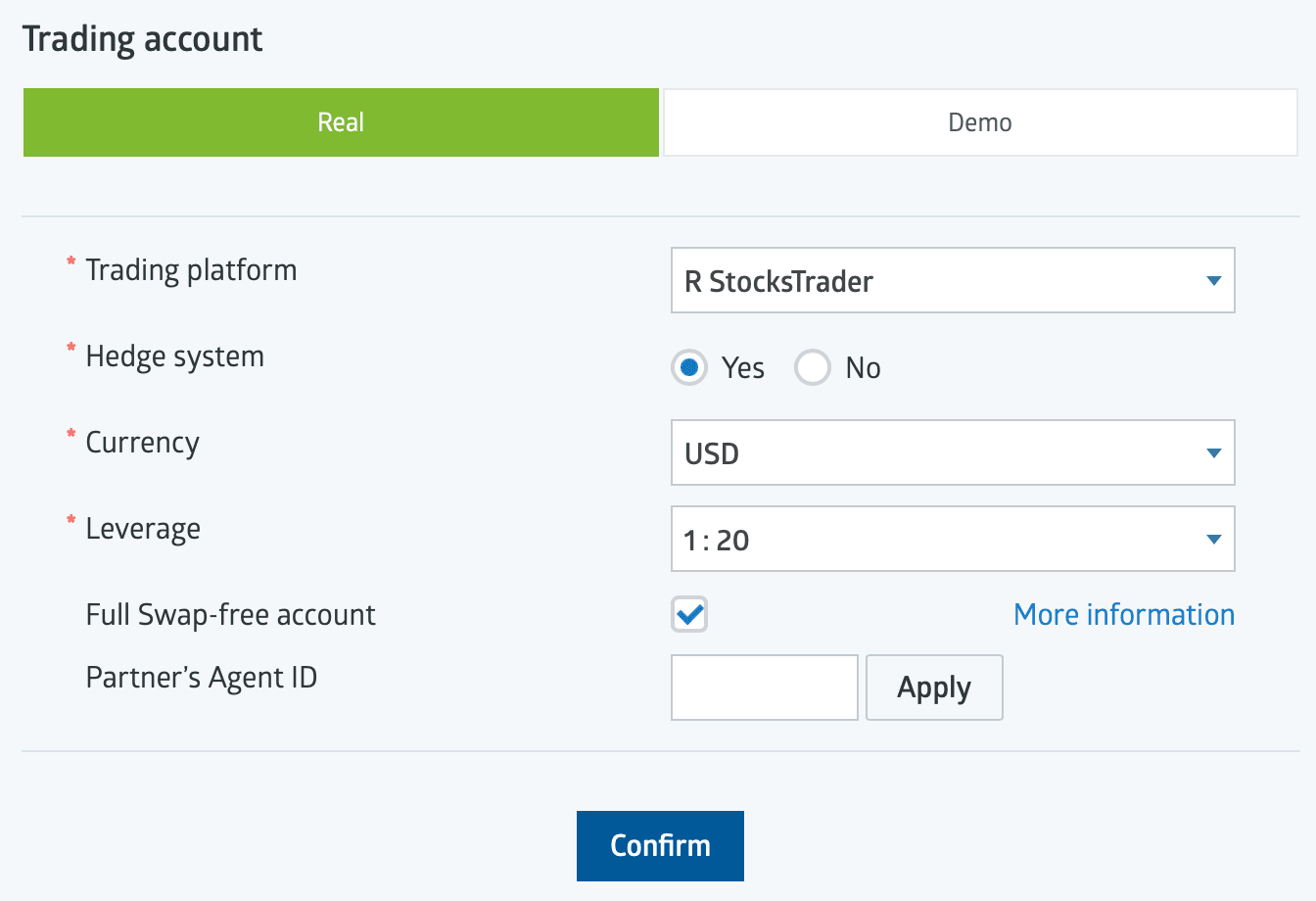
- 1R StocksTrader is its own account type — no MetaTrader server involved.
- 2Stock/CFD leverage is much lower than forex — 1:20 here vs up to 1:2000 on the forex accounts.
Who it suits. Traders focused on stocks and a wide CFD range who want an all-in-one, no-install platform — rather than the forex-first MetaTrader experience. For classic forex, MT4/MT5 above are the usual pick.
Troubleshooting login
- "Invalid account" — double-check the login number and that you picked a live vs demo server correctly.
- Wrong server — the server must match your account type (a Pro account won't log into an ECN server); copy the exact name from your Members Area.
- No connection — check your internet, that the client isn't blocked by a firewall, and that you're on the current official MetaTrader build.
Mind the mechanics before you trade live: What is leverage in forex? and risk management.
Availability & regulation
RoboForex serves retail clients through its offshore entity (RoboForex Ltd, Belize FSC) — including markets such as India, Malaysia, Nigeria and South Africa — but does not accept UK, EU, Canada, Australia or US retail clients. As an offshore broker it offers no statutory investor-protection scheme (only the private Financial Commission, up to EUR 20,000 per case). Verified mid-2026; re-confirm at publication.
Not available to retail clients in: the United States, the United Kingdom, the EU/EEA, Canada, Australia.
Frequently asked questions
Related guides
RoboForex Account Types: Which One to Open
RoboForex's account types compared — Pro, ProCent, ECN, Prime and R StocksTrader — what each costs, who it suits, and how to open one.
RoboForex App: Mobile Trading on iOS and Android
RoboForex's mobile apps — the MetaTrader 4/5 apps, R MobileTrader, R StocksTrader and the Members Area app — what each does, how to download, and how to log in.
RoboForex Bonus & No-Deposit Bonus: What's Actually on Offer
RoboForex's bonuses explained — the current $30 Welcome Bonus, how it unlocks, the terms that decide whether it's worth it, and why a bonus is never a reason to pick a broker.
RoboForex CopyFX: How Copy Trading Works
RoboForex's CopyFX explained — how to copy a trader, how to become a provider, the fees, and the risks of copy trading.
Written & tested by
The TradeCookbook team tests crypto exchanges and forex brokers on real, funded accounts and documents each step with original, dated screenshots. Every guide is fact-checked against primary sources and updated as platforms change.
- Hands-on testing on real, funded accounts
- Original, dated screenshots — never stock imagery
- Claims fact-checked against primary sources