roboforex
How to Open a RoboForex Demo Account
- Difficulty
- Beginner
- Time
- 2 min
On this page
A demo account is the smartest first step in forex: you trade with virtual money at real live prices, so you can learn the platform and test an approach without risking anything. Here's how to open one with RoboForex.
Open your demo in the Members Area, not inside the MetaTrader terminal. RoboForex retired in-terminal demo accounts in mid-2025 (they were moved to close-only in July 2025); demos opened through the Members Area are unaffected and behave like a normal account.
1. Open the Members Area and choose a demo
Register in the RoboForex Members Area and choose to open a free demo (practice) account rather than a live one. It works across RoboForex's platforms.

- 1Open a New Account → Demo account — start here, not inside the MetaTrader terminal.
2. Set the platform, balance and leverage
Pick MetaTrader 4 or 5, a virtual starting balance, and the leverage you want to practise with. Choose a balance close to what you'd realistically trade live — practising a $100 plan on a $100,000 demo teaches the wrong habits. If your virtual balance runs down, you can usually reset it from the Members Area or by contacting support.
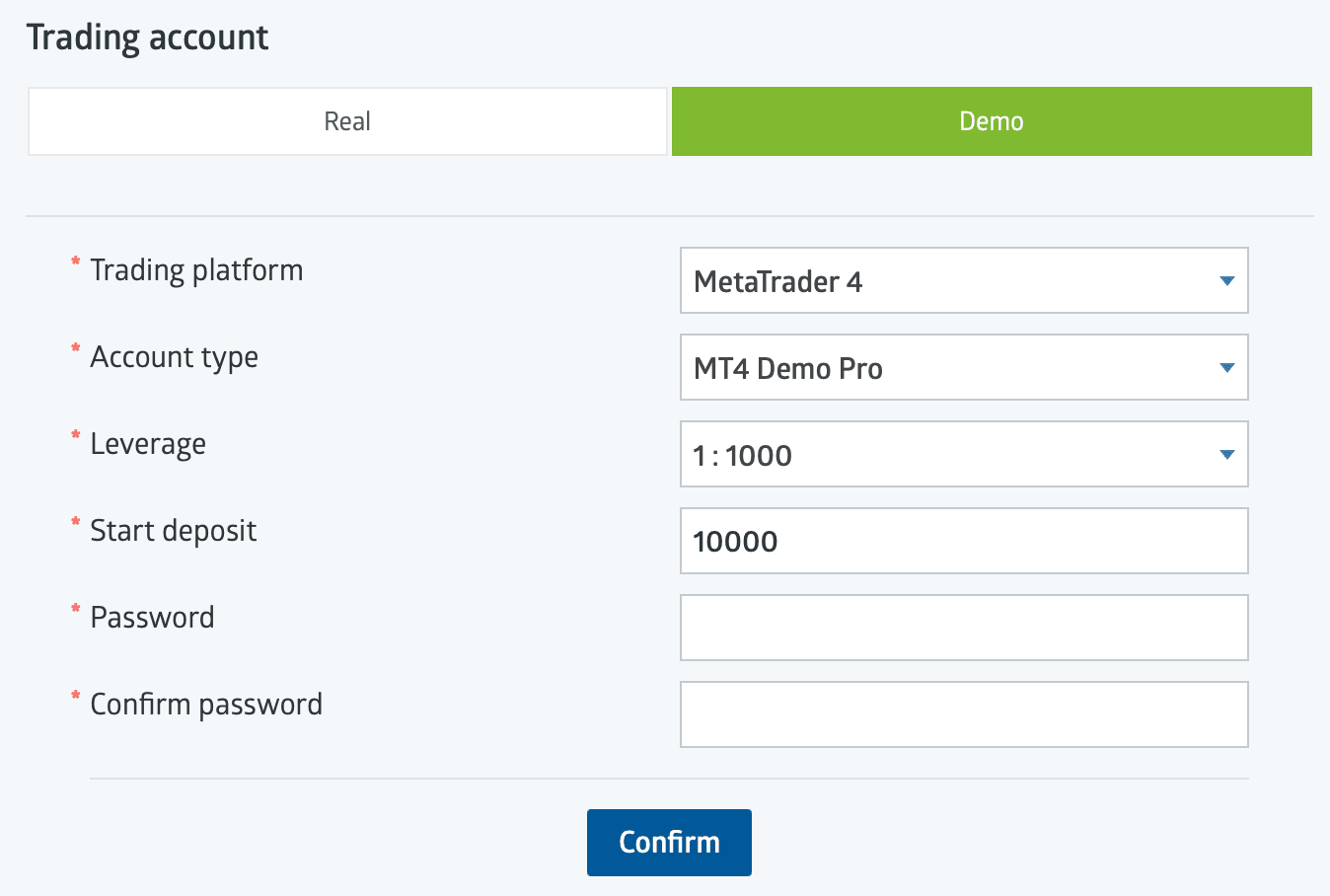
- 1Make sure the Demo tab is selected.
- 2Platform, account type, leverage and a realistic start deposit.
3. Get your demo login and server
Note your demo login ID, password and server — RoboForex's demo servers are named like RoboForex-Demo (standard) or RoboForex-DemoPro. You'll enter these in MetaTrader.
4. Log in on MetaTrader and practise
Install MetaTrader, open File → Login to Trade Account, enter the demo credentials and select the demo server, and you're trading with virtual funds. Practise the full workflow — placing and closing orders, setting a stop-loss, reading the spread — until it's second nature.
When you're ready for real money, the same login flow applies on a live account (with a live server) — see the RoboForex platforms guide. And learn the mechanics first: What is forex trading? · What is leverage in forex?.
Availability & regulation
RoboForex serves retail clients through its offshore entity (RoboForex Ltd, Belize FSC) — including markets such as India, Malaysia, Nigeria and South Africa — but does not accept UK, EU, Canada, Australia or US retail clients. As an offshore broker it offers no statutory investor-protection scheme (only the private Financial Commission, up to EUR 20,000 per case). Verified mid-2026; re-confirm at publication.
Not available to retail clients in: the United States, the United Kingdom, the EU/EEA, Canada, Australia.
Related guides
RoboForex Account Types: Which One to Open
RoboForex's account types compared — Pro, ProCent, ECN, Prime and R StocksTrader — what each costs, who it suits, and how to open one.
RoboForex App: Mobile Trading on iOS and Android
RoboForex's mobile apps — the MetaTrader 4/5 apps, R MobileTrader, R StocksTrader and the Members Area app — what each does, how to download, and how to log in.
RoboForex Bonus & No-Deposit Bonus: What's Actually on Offer
RoboForex's bonuses explained — the current $30 Welcome Bonus, how it unlocks, the terms that decide whether it's worth it, and why a bonus is never a reason to pick a broker.
RoboForex CopyFX: How Copy Trading Works
RoboForex's CopyFX explained — how to copy a trader, how to become a provider, the fees, and the risks of copy trading.
Written & tested by
The TradeCookbook team tests crypto exchanges and forex brokers on real, funded accounts and documents each step with original, dated screenshots. Every guide is fact-checked against primary sources and updated as platforms change.
- Hands-on testing on real, funded accounts
- Original, dated screenshots — never stock imagery
- Claims fact-checked against primary sources