roboforex
RoboForex CopyFX: How Copy Trading Works
- Difficulty
- Beginner
- Time
- 2 min
On this page
CopyFX is RoboForex's copy-trading platform — pick a trader and your account mirrors theirs automatically. (RoboForex now also brands it "Copy Trading Service," though the CopyFX name and copyfx.com are still widely used.) It's a hands-off entry point, but the risk is still yours. New to the idea? Start with what is copy trading and is copy trading profitable.
How CopyFX works
You open a CopyFX investor account, browse providers (traders open to being copied), allocate funds to the ones you choose, and your account copies their trades in proportion to your allocation — a provider risking 2% of their account moves roughly 2% of yours. You can adjust or stop copying, and the provider earns a fee (below) on the profit or via a subscription. It settles on investment periods of 1, 2 or 4 weeks.
How to copy a trader
- Open a CopyFX investor account. The investor minimum is $100.
- Choose a provider — judge by maximum drawdown and consistency, not just headline return. A high return built on huge drawdowns is a blow-up waiting to happen.
- Allocate and set your copy parameters (how much to commit, and any limits your account offers).
- Monitor — copying isn't "set and forget"; a provider's edge and risk appetite change, so review drawdown and results over time.
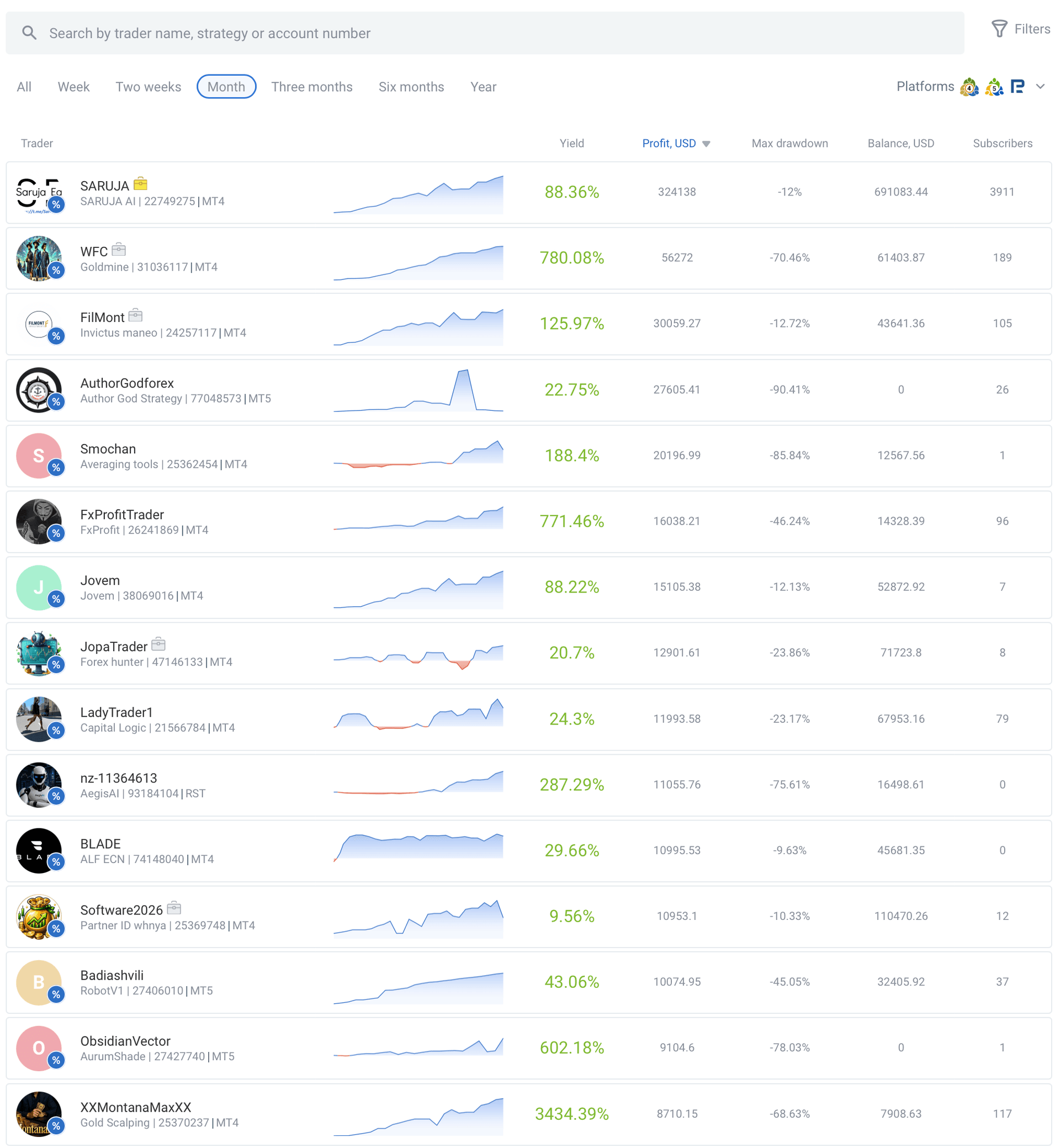
- 1Eye-catching yields — 780% here, 3434% further down the list.
- 2Check Max drawdown right beside it: −70%, −85%, even −90%. That's the number that matters.
The fees
The provider sets the model; you pay it out of your gains:
- Performance Fee (the main model) — a share of the profit they make for you, set by the provider anywhere from 5% to 50%, and charged only on new profit above a high-water mark (so you don't pay twice for recovering the same ground).
- Subscription Fee — a fixed periodic charge, paid weekly when you're in profit.
- No-commission — some providers trade without a fee.
Always read a provider's fee before subscribing and fold it into your expected net return.
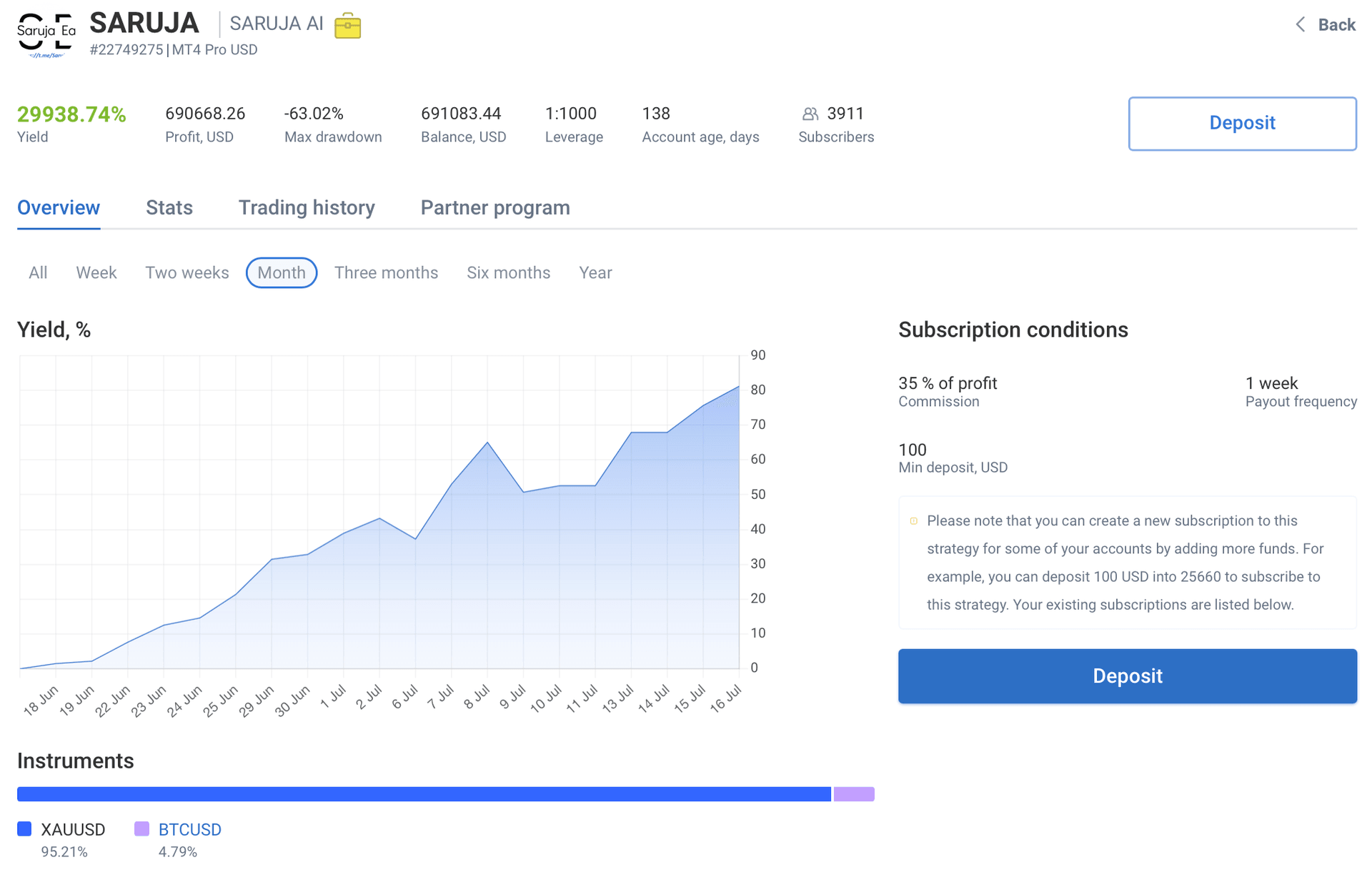
- 129,938% yield — but a −63% max drawdown over just 138 days. Read both.
- 2The provider's terms: a 35% performance fee, weekly payout, $100 minimum.
Becoming a provider
To be copied yourself: register, open a real MT4 account (or an MT5 account with the Hedging system enabled; R StocksTrader is also supported), deposit at least $100, then set your conditions (fee model and rate) and publish your strategy so investors can find and copy it. Commission is credited at the end of each investment period.
The risks (read before you allocate)
- You inherit the provider's leverage and drawdowns.
- Past performance ≠ future — strong records reverse.
- Fees come out of your profit — check the net.
- Offshore (Belize) — no local investor protection.
Compare the concept across venues in the copy-trading hub.
Availability & regulation
RoboForex serves retail clients through its offshore entity (RoboForex Ltd, Belize FSC) — including markets such as India, Malaysia, Nigeria and South Africa — but does not accept UK, EU, Canada, Australia or US retail clients. As an offshore broker it offers no statutory investor-protection scheme (only the private Financial Commission, up to EUR 20,000 per case). Verified mid-2026; re-confirm at publication.
Not available to retail clients in: the United States, the United Kingdom, the EU/EEA, Canada, Australia.
Frequently asked questions
Related guides
RoboForex Account Types: Which One to Open
RoboForex's account types compared — Pro, ProCent, ECN, Prime and R StocksTrader — what each costs, who it suits, and how to open one.
RoboForex App: Mobile Trading on iOS and Android
RoboForex's mobile apps — the MetaTrader 4/5 apps, R MobileTrader, R StocksTrader and the Members Area app — what each does, how to download, and how to log in.
RoboForex Bonus & No-Deposit Bonus: What's Actually on Offer
RoboForex's bonuses explained — the current $30 Welcome Bonus, how it unlocks, the terms that decide whether it's worth it, and why a bonus is never a reason to pick a broker.
How to Open a RoboForex Demo Account
A step-by-step walkthrough for opening a free RoboForex demo account and practising on MetaTrader with virtual funds — no risk, no deposit.
Written & tested by
The TradeCookbook team tests crypto exchanges and forex brokers on real, funded accounts and documents each step with original, dated screenshots. Every guide is fact-checked against primary sources and updated as platforms change.
- Hands-on testing on real, funded accounts
- Original, dated screenshots — never stock imagery
- Claims fact-checked against primary sources