bybit
Bybit MT4 and MT5: The Real Answer, and How to Use MetaTrader with Bybit
- Difficulty
- Intermediate
- Time
- 8 min
On this page
Bybit does offer MetaTrader 5 — through Bybit TradFi, its official MT5 product for forex and CFDs. What it doesn't do is run your crypto on MetaTrader: your spot and futures wallet lives on Bybit's own platform (per Bybit's official channels, June 2026), so there's no "Bybit MT4 download" and nothing native to install for the crypto side. This guide separates the two, shows the no-code way to actually use MetaTrader 5 with Bybit (TradFi), and gives the honest, niche answer for putting your crypto into MetaTrader.
Does Bybit have MT4 or MT5? (Short answer)
Yes — Bybit has MetaTrader 5, via its TradFi product (forex, metals, indices and stock CFDs). The catch is that it's not for your crypto: your everyday Bybit account — spot and derivatives/perpetuals — lives entirely on Bybit's own platform, which isn't MetaTrader. And MT4 is gone: Bybit discontinued it in 2024 and moved to MT5. So "does Bybit have MetaTrader?" really splits in two, depending on what you want to trade.
Two things get tangled together under "bybit metatrader," so let's separate them up front:
- Your Bybit crypto exchange account (spot, futures): runs on Bybit's own software. No MT4. No MT5. Nothing to download from MetaQuotes for it.
- Bybit TradFi (powered by MetaTrader 5): a distinct brokerage product for forex and traditional-finance CFDs (metals, indices, stocks, commodities) — TradFi is short for Traditional Finance — that uses the standard MT5 client. It is the official way to use MetaTrader with Bybit, but it doesn't trade your actual spot/derivatives crypto and isn't connected to your Bybit wallet (it's forex and TradFi CFDs — any crypto exposure there would be a CFD, not your coins).
So if your goal is to run MetaTrader 5 with Bybit, the TradFi route below is the official, no-code answer. If your goal is to trade your crypto (spot or perpetuals) from MetaTrader specifically, there is no native, first-party way — see the advanced note further down.
What Bybit actually offers instead (for crypto)
For your crypto account, instead of MetaTrader, Bybit gives you four native surfaces (all reachable from bybit.com/download, June 2026): a web platform, iOS/Android apps, a desktop app for Windows and macOS, and a built-in TradingView charting integration. In detail:
- A web trading platform in the browser.
- Mobile apps for iOS and Android.
- A desktop app for Windows and macOS (the "Bybit PC Client"). Per Bybit's official announcement, the PC Client went live on both Windows and Mac on 2 January 2026; the macOS build is distributed as a .dmg from bybit.com/download.
- A built-in TradingView charting integration, giving you TradingView's chart types, drawing tools and indicators directly inside Bybit's own web and app interfaces.
That TradingView integration is the honest answer to "where's my advanced charting?" for crypto. You can also connect Bybit as a broker on TradingView.com to place trades directly from TradingView charts. For most traders reaching for MetaTrader out of habit, this is the closest equivalent on the crypto side.
Only download Bybit apps from official channels at bybit.com/download. Unofficial domains (for example, one circulating as "bybitdesktop.app") are not confirmed official and should be treated with caution.
Why people think Bybit runs on MetaTrader — and what's really true
Almost everyone looking for "Bybit MetaTrader" is running on forex muscle memory. MetaTrader 4 and MetaTrader 5 are the default platforms across retail forex, so traders moving into crypto assume their exchange must offer an "MT4 download" too. For the crypto account it doesn't — but Bybit genuinely runs MT5 for forex/CFDs via TradFi, and it once ran an MT4 service that it has since closed.
| Claim | Status |
|---|---|
| Bybit spot/futures (crypto) run on MT4 or MT5 | False — Bybit's own platform |
| Official 'Bybit MT4 download' exists | False — MT4 discontinued in 2024 |
| Bybit offers an official MT5 product | True — Bybit TradFi (forex/CFD, no code) |
| You can trade forex / gold / indices in MT5 on Bybit | True — via Bybit TradFi |
| You can trade your crypto (spot / perps) in MetaTrader | No official way — only an unofficial bridge |
How to use MetaTrader 5 with Bybit: Bybit TradFi (the official, no-code way)
If your goal is simply to trade in MetaTrader 5 with Bybit, the official answer is Bybit TradFi — Bybit's own MT5 product. This is the regular-user path: no code, no API keys, just a normal MetaTrader broker login. Two things to know first:
- It requires identity verification (KYC) and a Bybit main account (subaccounts can't activate TradFi). You get a separate MT5 account with its own login ID and password, distinct from your Bybit login.
- It covers forex and traditional-finance CFDs — metals (gold, silver), oil, indices, US stocks and commodities (TradFi = Traditional Finance), 300+ symbols. It does not trade your actual spot/derivatives crypto, and it is not your Bybit wallet. Leverage is fixed per symbol (no manual adjustment); the account is funded by transferring USDT/BYUSDT, shown as USD-denominated margin (USDx). It went live around 30 July 2024 and settles the MT4-vs-MT5 question: it's MT5 only (Bybit discontinued MT4 in 2024).
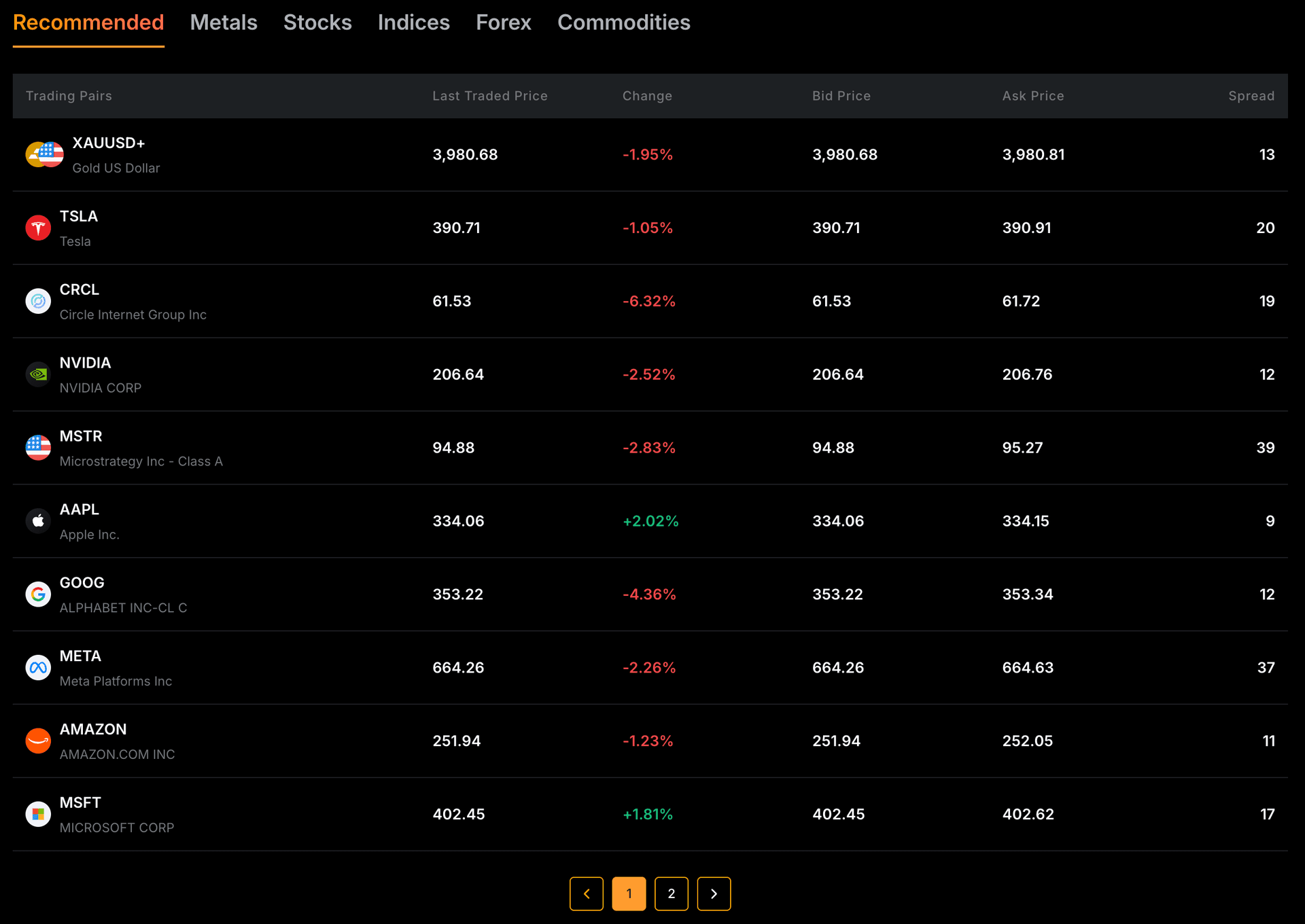
- 1TradFi's markets — metals, stocks, indices, forex, commodities. No crypto.
- 2Each instrument has its own spread — TradFi's forex/CFD pricing, separate from Bybit's crypto fees.
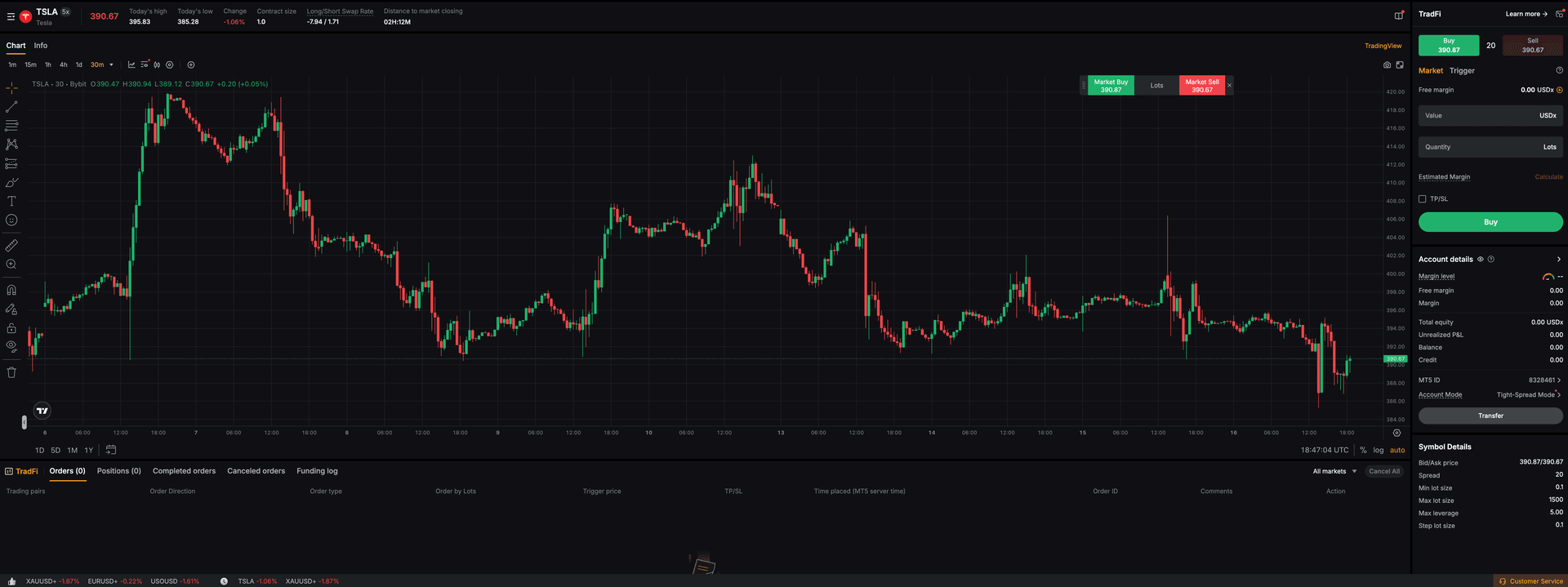
- 1You're trading a TSLA stock CFD — a TradFi instrument, not your crypto.
- 2The TradFi account has an MT5 ID (and orders run on MT5 server time) — proof it runs on MetaTrader 5, without installing the desktop app.
- 3Symbol details: fixed 5x max leverage, USDx margin and its own spread — TradFi's forex/CFD terms, separate from Bybit crypto.
Connecting MetaTrader 5 to Bybit TradFi
Activate Bybit TradFi
On Bybit, go to Trade -> TradFi -> Apply Now and accept the terms (complete identity verification if you haven't). TradFi runs on a Bybit main account only.
bybit.com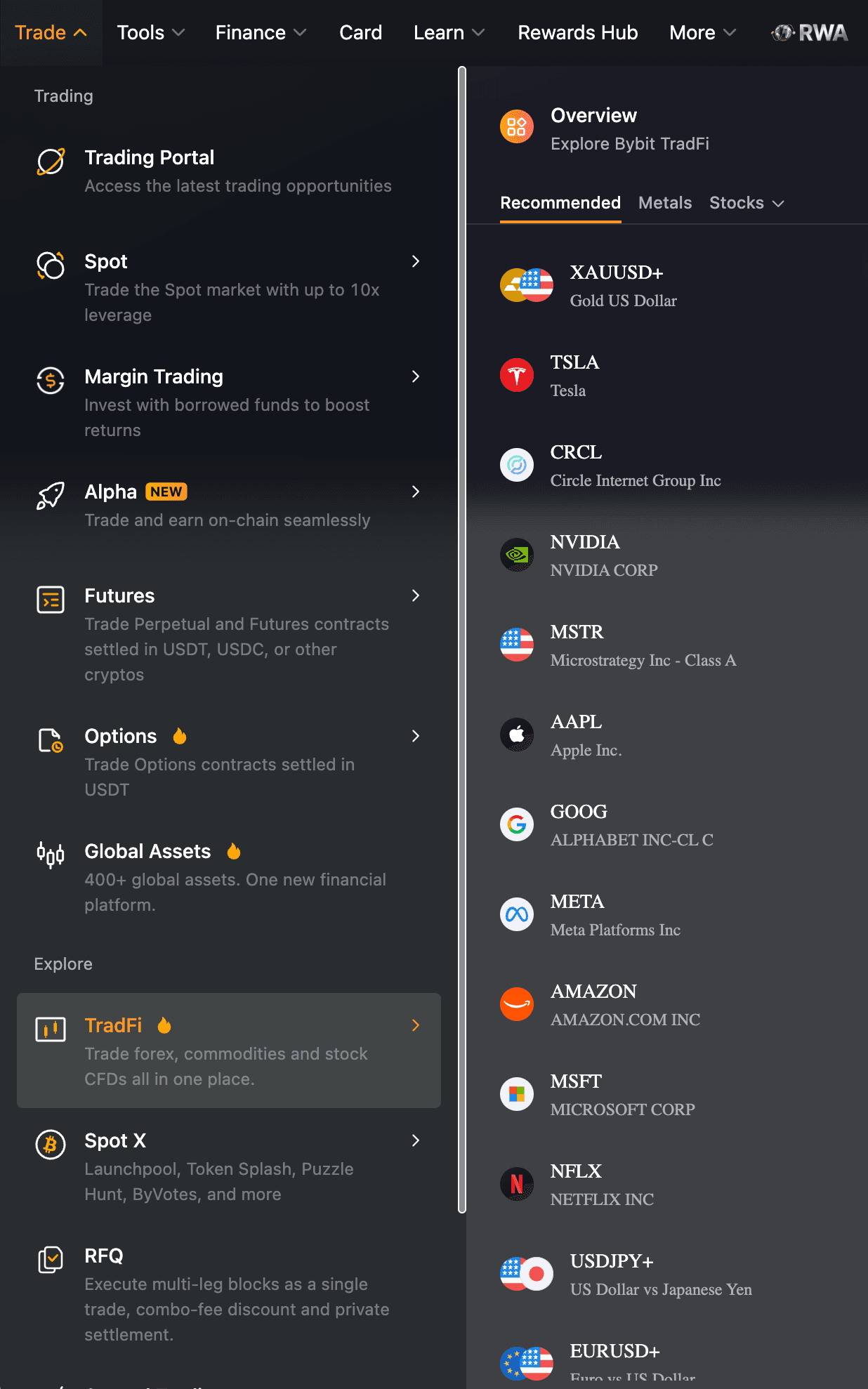
TradFi lives under Trade → TradFi. Look at what it trades — gold, forex and US-stock CFDs, not crypto: that's the tell that TradFi (and its MT5) is a separate forex/CFD product, not your Bybit spot or derivatives wallet.Original screenshot · captured July 2026 - 1TradFi assets are forex, commodities and stock CFDs (gold, TSLA, EURUSD) — never your actual crypto.
- 2Trade → TradFi (under Explore) — this is where you apply/activate.
Get your MT5 login details
On the TradFi (MT5) asset page, find your MT5 Login ID and the server Bybit assigned you, and set your master password (8-16 characters, with upper- and lower-case letters, a number and a special character). The investor password is a separate, read-only login.
Install MetaTrader 5 and log in to the Bybit server
Install the standard MetaQuotes MetaTrader 5 client (there is no separate "Bybit MT5 app"). Open File -> Login to Trade Account, then enter your account number, master password and the Bybit server — for example
Bybit-Live, orBybit-Demofor a risk-free demo — and click OK.Trade TradFi symbols from MT5
Once connected, Market Watch lists your Bybit TradFi instruments and you trade them from MT5 like with any broker. Just remember the scope: forex and CFDs, not your crypto.
That's the whole MetaTrader experience on Bybit — official and code-free. The only catch is that it's forex/CFD, not your actual crypto.
Advanced: putting your crypto into MetaTrader (niche, unofficial)
Bybit TradFi is forex/CFD — it can't touch your actual crypto. If you specifically want your spot or derivatives positions (BTC, ETH, perps) inside MetaTrader, there is no official, no-code way: your crypto account has no MetaTrader server, only a REST API.
The only route is an unofficial third-party Expert Advisor that calls Bybit's V5 API from inside MT5 (for example, paid MQL5-Market connector libraries). The mechanism is sound — an MT5 EA can call the same API that countless bots use — but it is unofficial, unsupported by Bybit, and we have not independently verified any specific connector end-to-end. It needs a trade-only API key (never withdrawal), is fragile, and breaks when the API changes.
For almost everyone this isn't worth it. To automate crypto on Bybit, native grid/DCA bots, the TradingView integration, or a Python bot are simpler and better supported than bolting MetaTrader onto a REST API.
MT4 vs MT5 with Bybit — clearing up the version question
- MT4: discontinued by Bybit in 2024. There is no current official Bybit MT4 download.
- MT5: the only MetaTrader version Bybit runs today, and only via the separate Bybit TradFi product — not your spot/derivatives wallet.
So for your crypto-exchange account, neither MT4 nor MT5 is natively supported; for forex and CFDs, MT5 (TradFi) is the answer.
Honest alternatives: brokers that bundle MT4/MT5 with crypto
If you need MetaTrader with crypto in one place — something Bybit TradFi can't do — several regulated CFD brokers bundle them. The important honesty caveat: these offer crypto as CFDs (leveraged derivatives), not actual spot coins or custody, and crypto-CFD trading is restricted or banned for retail clients in some jurisdictions (for example, the UK FCA ban on crypto derivatives for retail). Always verify current asset counts, leverage and availability in your country on each broker's official site at the time you read this.
| Broker | Platforms | Crypto (approx.) | Note |
|---|---|---|---|
| AvaTrade | MT4 + MT5 | ~20-25 crypto CFDs | Beginner-friendly, multi-regulated |
| XM | MT4 + MT5 | 50+ crypto CFDs | Low minimum deposit, 24/7 crypto CFDs |
| BlackBull Markets | MT4 + MT5 + TradingView | ~27 crypto CFDs | MetaTrader plus TradingView in one |
| FXTM | MT4 + MT5 | ~31 crypto CFDs | MetaTrader Pro / research plugins |
| Vantage | MT4 + MT5 | ~62 crypto CFDs | Free VPS for funded accounts |
The trade-off is real: those brokers give you MetaTrader but only CFD exposure. Bybit gives you a real spot/derivatives exchange with custody of actual coins (plus TradFi MT5 for forex/CFDs on the side). Which matters more depends on whether you're optimizing for the platform or for owning the asset.
Staying on Bybit's native tools
If MetaTrader isn't a hard requirement for your crypto trading, the simplest path is Bybit's built-in TradingView integration — the native, no-bridge alternative for advanced charting and trading directly from the chart. For the full setup, see our Bybit TradingView guide.
Bybit fees at a glance
These are Bybit's standard trading fees for the native crypto exchange (the TradFi MT5 product has its own forex/CFD pricing, with Zero-Fee and Tight-Spread modes):
| Market | Maker | Taker |
|---|---|---|
| Spot | 0.1% | 0.1% |
| Futures | 0.02% | 0.055% |
For the full picture of Bybit's spot, derivatives, copy trading, grid bots, P2P and Earn features, see our Bybit hub. If you're weighing automation, our Bybit copy trading walkthrough covers a no-code way to mirror experienced traders without touching the API.
Bottom line
There's no MT4 or MT5 to download for your Bybit spot or futures account — but Bybit TradFi gives you official MetaTrader 5 for forex and CFDs, no code required, and the native TradingView integration covers advanced charting for crypto. If you're opening an account to use those tools:
Frequently asked questions
Related guides
Is Bybit Available in Canada? (No — Here's What to Use)
No — Bybit exited Canada in 2023 after an OSC settlement and doesn't serve Canadian residents. Here's what happened, why, and the CSA-registered exchanges Canadians use instead.
Is Bybit Legal in India in 2026? FIU Status and Tax
Yes — as of 2026 Bybit is legal in India and FIU-IND registered. What the 2025 ban actually changed, what you can trade now, and how the flat 30% crypto tax works.
Bybit Fees Explained: Spot, Futures, Deposits and Withdrawals
A clear breakdown of Bybit's trading fees — spot and futures maker/taker rates, funding, deposits and withdrawals — laid out in a dated table.
Bybit Funding Rate Explained: It's Not a Fee
What Bybit's funding rate is, how often it's charged, when you pay vs receive, and why it isn't a fee Bybit collects — with a worked example.
Written & tested by
The TradeCookbook team tests crypto exchanges and forex brokers on real, funded accounts and documents each step with original, dated screenshots. Every guide is fact-checked against primary sources and updated as platforms change.
- Hands-on testing on real, funded accounts
- Original, dated screenshots — never stock imagery
- Claims fact-checked against primary sources